On Rival, Agents combine workflows, tools, guardrails, memory, and the AI model they run on. Think of the model as the brain, and Rival as the body that turns that intelligence into action.
What LLM’s are available on Rival?
Rival is model-agnostic. You aren't locked into a single AI provider or model. Choose from Rival-hosted models, direct connections to leading providers, or a curated library of models available through OpenRouter.
Included & Rival-Hosted
DeepSeek V4 Flash: Fast, capable, and included with Rival. No API key required. A strong choice for everyday tasks where speed and efficiency matter.
DeepSeek (Rival-hosted): Access DeepSeek V4 running on Rival's own GPU infrastructure without managing a separate model provider.
OpenRouter Models
Rival also gives you access to a broad selection of models through OpenRouter without requiring a separate provider API key, including:
Anthropic: Claude Opus 5, Claude Sonnet 5, Claude Opus 4.8, Claude Opus 4.8 Fast, Claude Opus 4.7, Claude Sonnet 4.6, Claude Sonnet 4.5, Claude Haiku 4.5
OpenAI: GPT-5.6 Sol Pro, GPT-5.6 Sol, GPT-5.4, GPT-5 Pro, GPT-5.1 Codex Max
DeepSeek: DeepSeek V4 Pro, DeepSeek V4 Flash, DeepSeek V3.2, DeepSeek R1
Kimi: Kimi K3, Kimi K2.7 Code, Kimi K2.6, Kimi K2 Thinking, Kimi K2
Qwen: Qwen3.7 Max, Qwen3.7 Plus
Other models: MiniMax M3, GLM-5.2, MiMo-V2.5-Pro, MiMo-V2.5, Tencent Hy3, Poolside Laguna M.1, Nemotron 3 Ultra 550B
OpenRouter is designed to provide unified access to models from many different providers, which means Rival can expand the models it offers as the AI landscape changes rather than forcing customers to standardize on a single model family.
Bring Your Own Model Provider
If you already have relationships with AI providers, Rival also lets you connect directly using your own API keys:
Anthropic Claude: Strong for complex reasoning, writing, instruction-following, and agentic workflows.
OpenAI: Access GPT-4o and other supported OpenAI models for general-purpose reasoning, multimodal tasks, and tool use.
Google AI Studio: Access Google's Gemini models for fast, multimodal, and general-purpose AI workloads.
Groq: High-speed inference for supported open models.
DeepSeek: Connect directly to DeepSeek using your own API credentials.
xAI: Access Grok models directly from xAI.
Mistral: Access Mistral's commercial model family through Mistral Cloud.
Perplexity: Useful for web-grounded AI experiences and tasks that benefit from current information.
Together AI: Access a broad catalog of hosted open models.
Cohere: Access Command and other Cohere models, particularly useful for enterprise language and retrieval workloads.
The point isn't to pick one AI model and build your entire strategy around it. Rival lets you choose the right intelligence for the work.
How do you choose the right LLM?
There isn't one "best" LLM. The right model depends on the work you're asking it to do.
1. Capability: Start with the task. Coding, deep reasoning, research, writing, extraction, and high-volume routine work don't necessarily need the same model. A more powerful model isn't automatically a better choice for every Agent.
2. Cost: Don't pay for intelligence you don't need. Smaller and faster models can handle many routine tasks efficiently. Reserve more expensive frontier and reasoning models for work where the additional capability actually improves the outcome.
3. Speed: For high-volume workflows and user-facing Agents, latency matters. Faster models can dramatically improve the experience even when they aren't the most powerful option available.
4. Reliability: Provider availability, rate limits, and capacity can change. Rival gives you multiple ways to access AI, including Rival-hosted models, OpenRouter, and direct provider connections, so your AI strategy doesn't have to depend on a single provider.
Selecting an LLM when running an agent
You want your Agent to work best for your specific circumstances.
To select an LLM or model on Rival, navigate to the agent menu in the left taskbar.
Select the agent you would like to use.
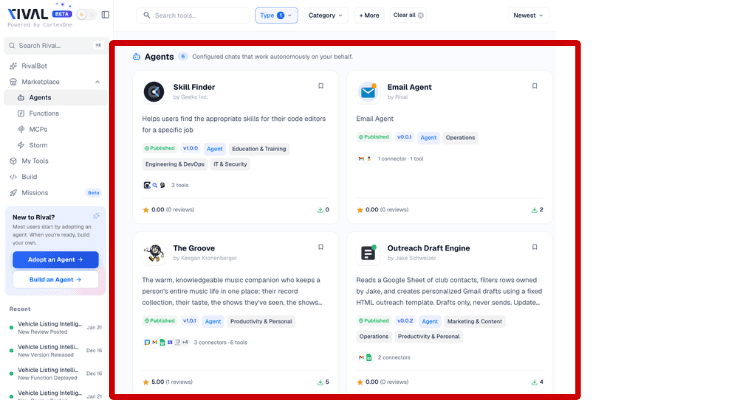
Adopt the agent by selecting the “Adopting an Agent” on the right side of the screen.
You can access what LLMs your Agent will run with from the task bar at the top of the screen.
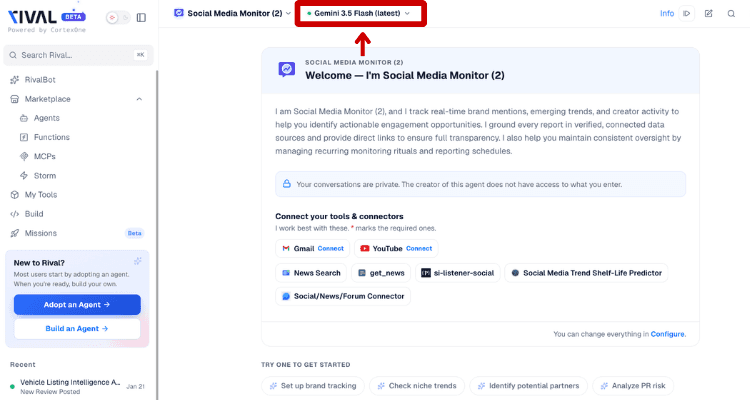
After selecting the taskbar, a dropdown menu will appear that you can use to select your LLM/model.
Rival lets you switch anytime. If one model isn’t working the way you want it to, you can always navigate this back to this taskbar to change it.
The Bottom Line
Don't build your AI strategy around one model. Build it around the work you need AI to do.
Rival gives you access to models across OpenAI, Anthropic, DeepSeek, Kimi, Qwen and other leading model families, while letting you choose how they're accessed. As better models emerge, you can change the brain without rebuilding the body.
I actually think that last sentence is the strongest way to bring the opening analogy full circle. It also reinforces Rival's "don't bet your AI strategy on one model" positioning without making the blog feel like a product pitch.