One of the biggest advantages of agents is their ability to take action on your behalf. You give them a goal, and they can complete the steps needed to get the job done. But with that autonomy comes responsibility.
That's where guardrails come in.
Guardrails define the boundaries your agent must operate within. They help ensure your agent works efficiently, safely, and in alignment with your expectations. Whether you're protecting sensitive information, requiring approvals, or restricting certain actions, guardrails give you control over how work gets done.
This guide explains what guardrails are, why they matter, and how to use them effectively.
What Is a Guardrail?
A guardrail is a rule that limits or controls what an agent can do.
Think of guardrails like the boundaries on a highway. The agent can move quickly toward its destination, but the guardrails keep it from veering into places it shouldn't go. They provide freedom within defined limits. With guardrails in place, your agent can operate autonomously while still following the rules you set. You decide what actions require approval, what data can be accessed, what systems can be modified, and where the agent's authority begins and ends.
The result is the best of both worlds: automation with control.
Why Guardrails Matter
When an agent is autonomous, it makes decisions and takes actions without checking in at every step. That is what makes it useful, and it is also why you set boundaries before it ever acts. Guardrails keep it in a defined lane every time. Guardrails are also agent specific. Every agent you build can have its own set of rules. One agent might be locked down tight while another has more freedom. It is entirely up to you.
What You Can Set Guardrails For
Guardrails keep an agent helpful without letting it overstep. A few common examples:
Stay in their lane: keep the agent from acting like a doctor, lawyer, or financial advisor, and have it point you to a real expert instead. For example: do not tell me what medication to take.
Require a final yes: let the agent prepare the work but wait for your approval before it acts. For example: do not send an email without asking.
Separate fact from guess: there are some actions you may never want your agent taking at all, so you can rule them out completely. For example: do not make purchases or delete files.
How to Set a Guardrail
Setting a guardrail takes under a minute:
Open “My Tools” on the left and click the agent you want to set rules for. This can be any agent you adopted from the marketplace or built yourself.
After opening your agent, click the settings icon by the prompt bar to open the agent's settings, then scroll down in the first tab “General” until you reach “Personality & Guardrails”.
Click “Add Guardrail”.
In the text bar, type the action you want to govern, for example, send emails without asking.
On the right, choose how the agent should handle it: Allowed, Needs Approval, or Blocked.
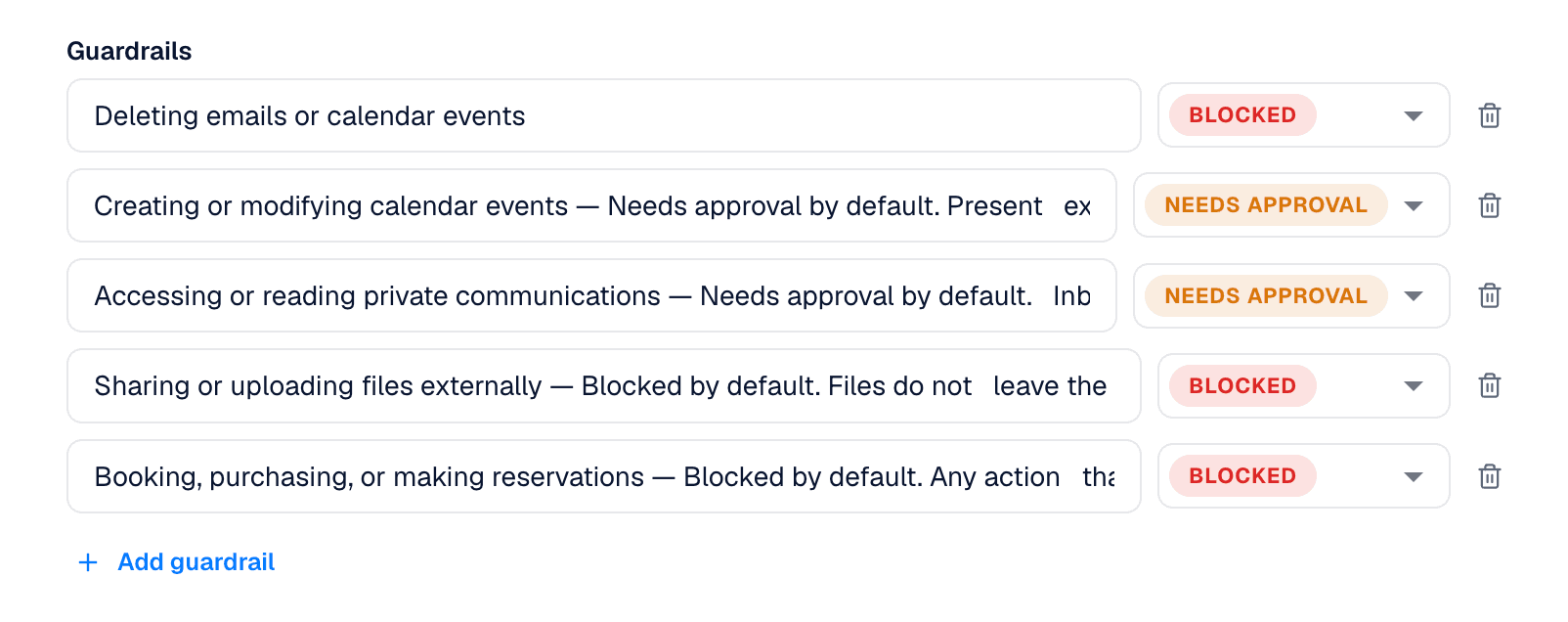
Those three settings are the heart of a guardrail:
Allowed: the agent has full access to do what you typed, with no check-in needed.
Needs Approval: the agent prepares the action but waits for your go-ahead each time before doing it.
Blocked: the agent is never allowed to do this action.
Add as many guardrails as you want, and change any of them whenever you like. Nothing here is permanent.
A Tip: Start Strict
One rule of thumb: start strict. It is much easier to loosen a guardrail later than to clean up after an agent that did too much. Block anything high-stakes at first, then open things up as you build trust in what the agent does.
TL;DR
A guardrail is a rule that tells your agent what it cannot do.
Set them once in an agent's settings, choosing Allowed, Needs Approval, or Blocked for each action. From then on, your agent can move on its own without ever crossing a line you did not approve.